Email to API: A 2026 Developer's Guide to Inbound Parsing
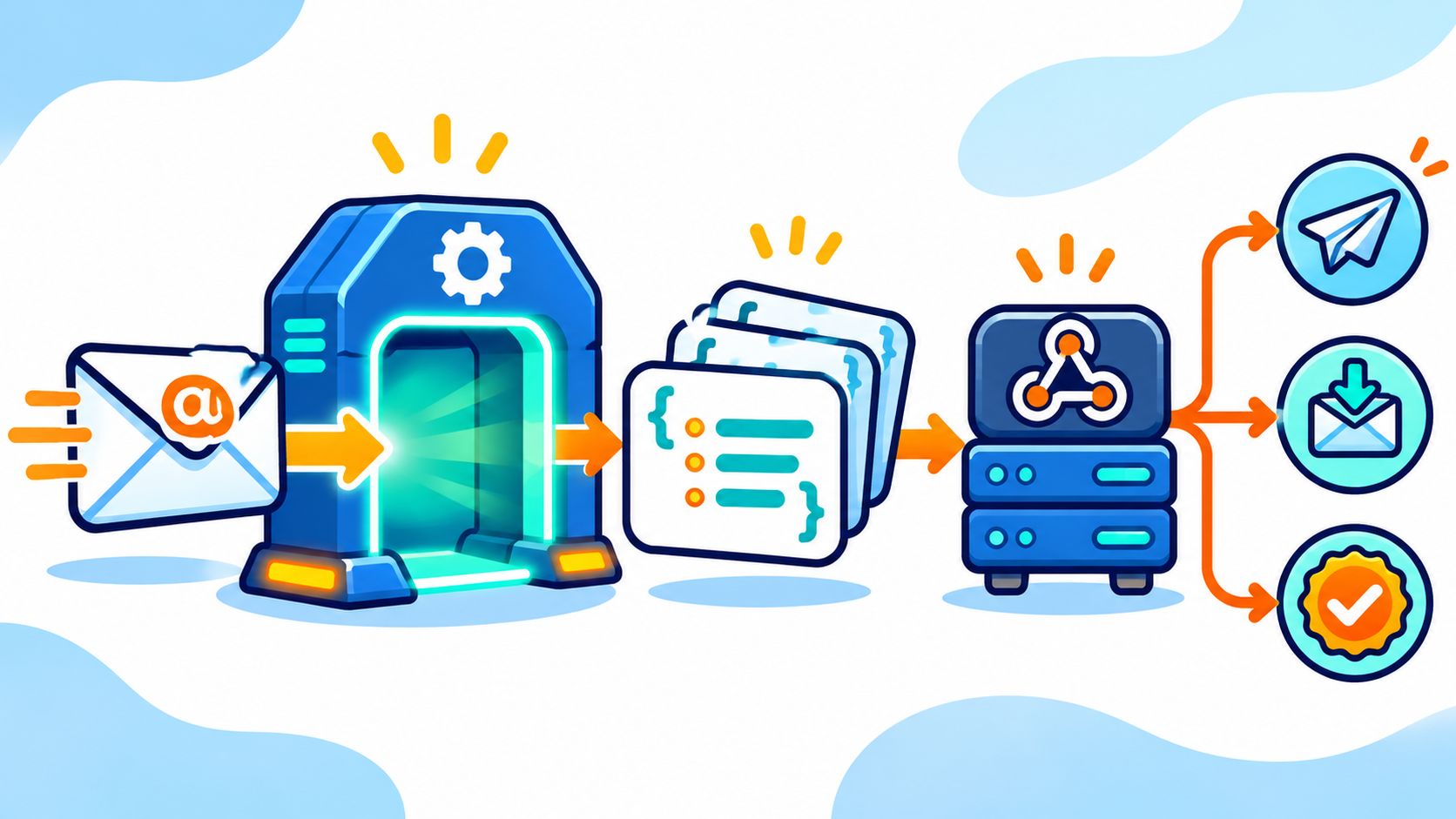
An agent gets its own address on Monday. By Wednesday it has replied to a newsletter as if it were a support ticket, opened a thread with a supplier nobody asked it to contact, and sent the same status update twice because the first request timed out. Every one of those sends returned 200. Nothing in the logs reads as a failure.
That gap is what this guide is about. Email to API work looks like three calls (receive, send, listen), and the hard parts sit either side of them. An inbox is untrusted input that reaches your model before your code inspects it, and a success response from a send endpoint means the request was accepted, not that the mail arrived.
Table of Contents
- Three Directions Email Takes Into an API
- How Inbound Email Turns Into a JSON Webhook
- Treat Every Inbound Email as Untrusted Input
- Choosing How Your Code Receives Events
- Sending Through an API Without Duplicates or Complaints
- Send and Receive Calls in Code
- Connect Your First Agent Mailbox
Three Directions Email Takes Into an API
Email is a letter that arrives at an address. An API is a form your code fills in. Email to API is the translation layer between the two, and it runs in three directions, whether you're wiring an agent into Claude Code, a Cursor session, or a REST handler sitting behind an MCP tool.
Inbound parsing starts when a message reaches an address you own. The provider turns the raw MIME into JSON and posts it to your endpoint. Outbound sending starts when your code calls a send endpoint with a recipient, subject and body, and gets back a message ID with an accepted status. Event delivery starts after either of those, when the provider reports what happened next: a bounce, a temporary deferral, a spam complaint, a delivery confirmation.
The direction people forget is the third one. A send call that returns 200 has confirmed that the provider took custody of the request. It has told you nothing about whether a person's mail server accepted the message.
Underneath the JSON, the old protocols are still doing the work. SMTP went into service on ARPANET in 1983 and still passes messages between mail servers, with POP arriving in 1984 and IMAP in 1988, as Nylas' comparison of IMAP, the Gmail API and the Graph API sets out; IMAP was itself standardized as RFC 3501 in 2003 and updated by RFC 9051 in 2021. Your code speaks none of it. It makes HTTPS calls and reads JSON back. That split is why APIs expose sending, reading, searching, threading and attachments as separate operations instead of one transaction.
| Direction | Starts when | Your code receives | Typical use |
|---|---|---|---|
| Inbound parsing | a message reaches an address you own | JSON with sender, subject, body, headers and attachments | support mail, agent replies |
| Outbound sending | your code calls the send endpoint | a message ID and an accepted status | notifications, replies, outreach |
| Event delivery | the provider records what happens next | a webhook or stream event for each state change | bounce handling, suppression, handoffs |
Three questions decide which pieces you need:
- Does mail need to arrive at an address you control? You need inbound parsing, a handler that verifies signatures, and a queue behind it.
- Does your code need to send? You need an idempotent send path and suppression state that lives outside the model's reach.
- Do you need to hear about outcomes? You need event delivery plus a reconciliation job, because webhooks get missed and retried.
Answer those before writing a line of integration code. Most broken agent mailboxes have all three directions half-built rather than one built properly.
How Inbound Email Turns Into a JSON Webhook
Inbound is the path that fails without warning. The message arrives, the provider accepts it, and nothing reaches your handler because a retry budget ran out or a signature check threw a 500 on every attempt. The full chain looks like this.
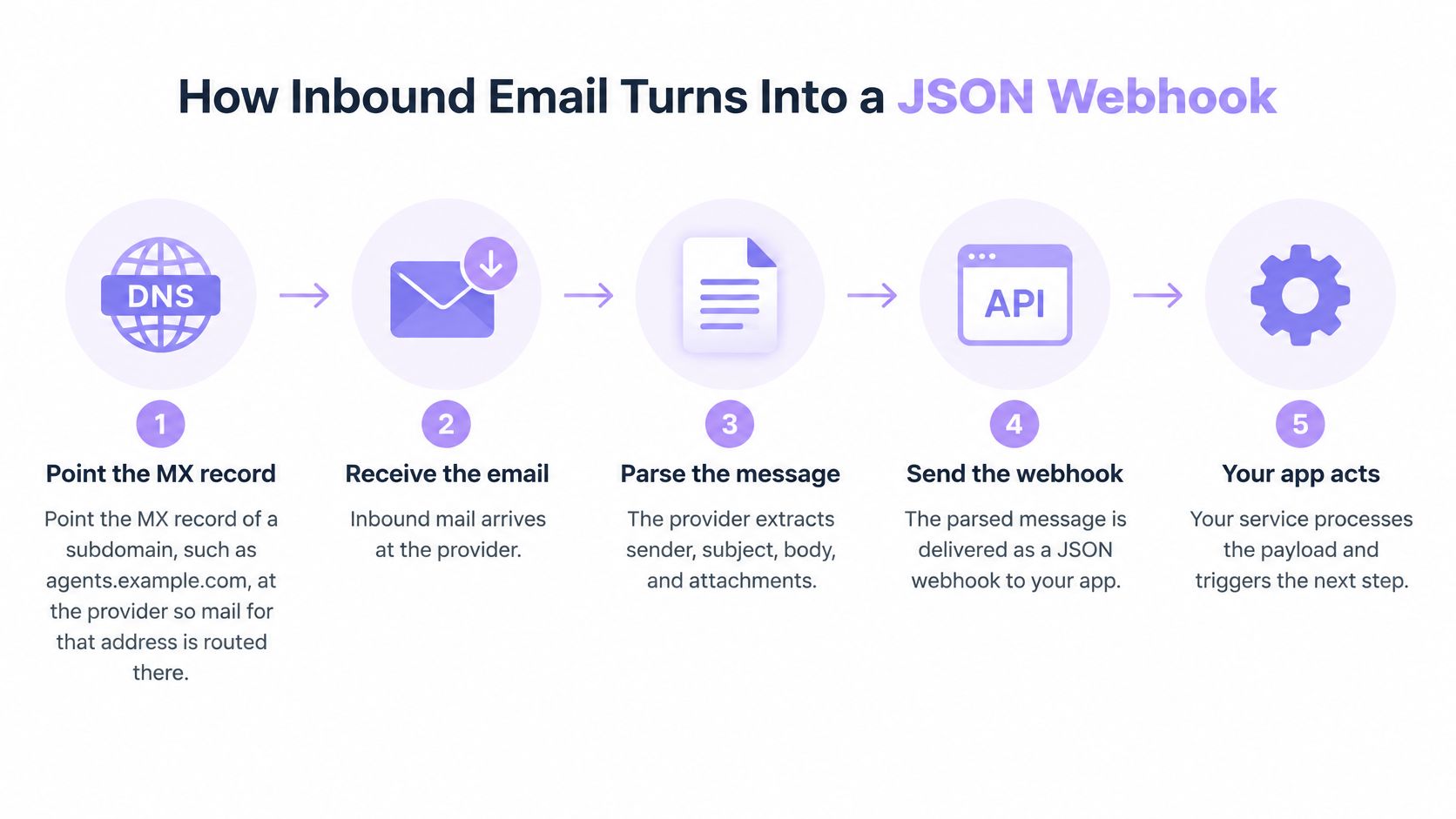
1. Point mail at the provider. An MX record on a subdomain routes mail for that address to the provider's servers. This is the step that makes the address yours. Skip it and senders get rejected at their end, where you can't see it and no amount of application code helps.
2. SMTP delivery. The sender's mail server connects and hands over the message. The provider answers with a success code and takes custody of the bytes.
3. MIME parsing. A raw email is a container: headers, a plain-text part, usually an HTML part, and zero or more attachments, each with its own content type and transfer encoding. The provider does this parsing so your handler never touches quoted-printable bodies or multipart boundaries.
4. JSON shaping. The parsed message becomes an object with keys like from, to, subject, text, html, message_id, in_reply_to, and an attachments array.
5. Signed POST. The provider sends an HTTPS POST of that object to your endpoint with a signature header.
6. Fast acknowledgement. Verify the signature, return 2xx, queue the work. Running model inference inside the request is the most common cause of duplicate processing: a slow handler trips the provider's timeout, the provider resends, and now two workers are handling the same message.
7. Idempotency. Key processing on message_id. Never on arrival time, never on a UUID you generate.
If webhook plumbing is new to you, getting started with webhooks covers the request, retry and acknowledgement mechanics that everything above assumes.
A payload you should expect looks roughly like this. Field names differ between providers, and the ones you'll branch on sit at the top.
{
  "message_id": "<CAF9x2@mail.sender.net>",
  "from": "ops@sender.net",
  "to": ["agent@agents.yourdomain.com"],
  "subject": "Re: invoice 4471",
  "text": "Can you resend the March statement?",
  "html": "<p>Can you resend the March statement?</p>",
  "in_reply_to": "<CAF1a7@mail.sender.net>",
  "attachments": [
    {"filename": "march.pdf", "content_type": "application/pdf", "size": 82913}
  ]
}
Test with one message before anything else. Send a single email to the subdomain and confirm that exactly one POST arrives with the fields you expect. Two POSTs mean your handler is too slow or returned a non-2xx. Zero means the mail never reached the provider, so check routing before you debug the handler.
Treat Every Inbound Email as Untrusted Input
Parsing tutorials treat an inbound message as text to clean up. The numbers argue for treating it as hostile. In the first phase of the LLMail-Inject benchmark, organizers recorded 370,724 submissions from 292 teams; the attack email was retrieved in about 362,000 cases, went undetected in about 180,000, and caused the email-sending tool to be invoked in 7,200 cases marked as exfiltration, according to the LLMail-Inject benchmark study.
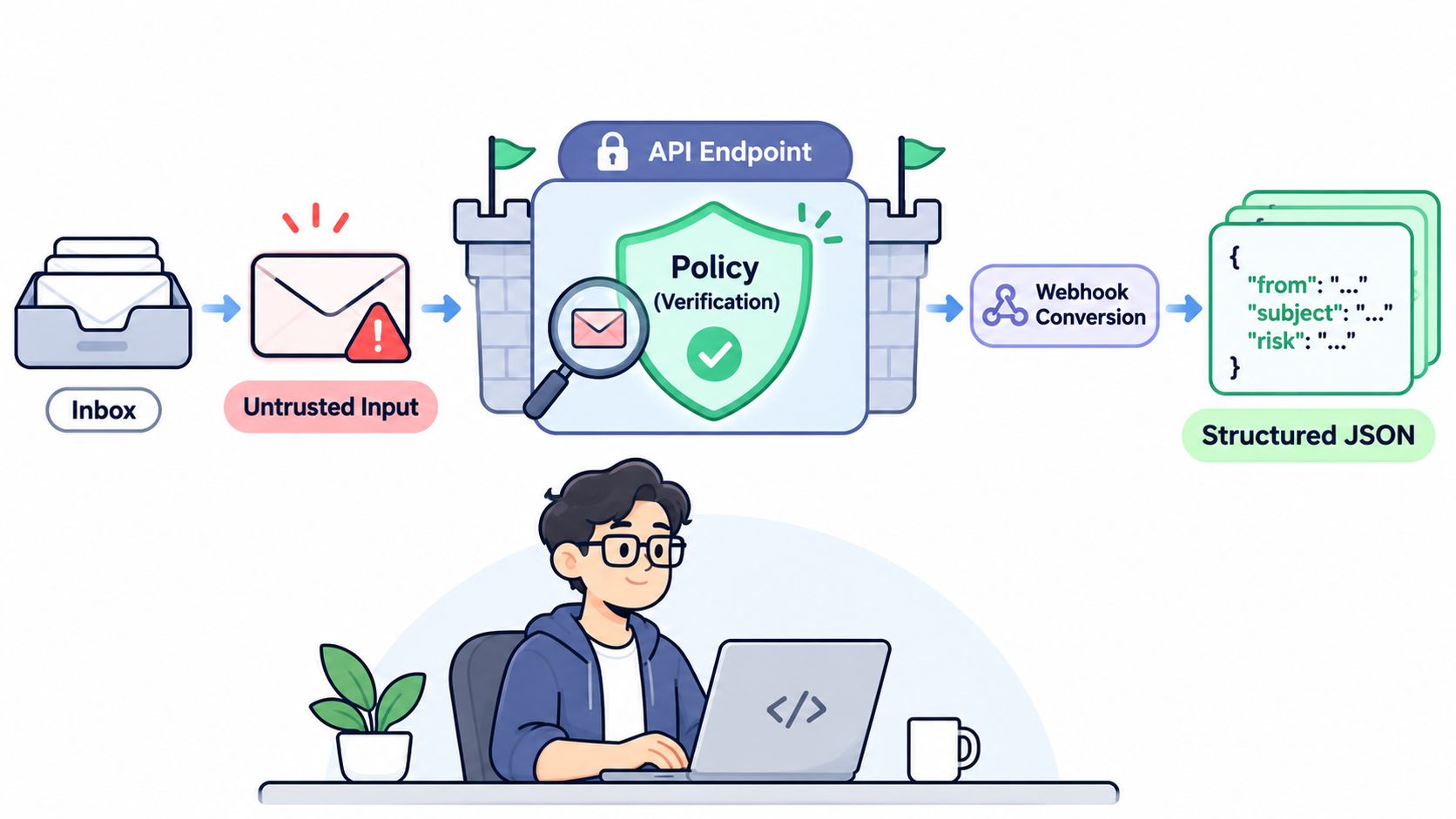
Detection alone doesn't close that gap. NIST's account of an agent red-teaming competition covers more than 250,000 attack attempts against 13 frontier models, and found at least one successful agent-hijacking attack against every target model, including scenarios where external data such as email carried the payload.
The preview pane isn't a boundary either. ReversingLabs' writeup of an AI summary attack describes one case where 1,009 characters reached a summarizer, only 537 were displayed to the person, and 472 hidden characters carried injection material. If a human reads a clean message while the model reads something else, your security model has to account for the gap.
What separates a testable inbox from a compromised one is the chain, not the wording of any single message. An analysis of attacks on LLM email agents walks through the sequence: the attacker sends a crafted email, the agent retrieves it, its picture of mailbox state gets fabricated with artifacts that resemble SMTP reply codes or IMAP responses, and the model then performs a sensitive action such as forwarding private information or deleting mail. Phrase filters miss this because the payload exploits operational context.
Practical rule: an inbound message is data about a request, never the request itself. Anything that looks like an instruction is something to act on only after your own code has authorized the action.
The boundaries that hold up:
- Separate content from policy. System rules live in code and configuration, not in the same context window as the message body.
- Quarantine before retrieval. Suspicious originals get held outside the agent's normal inbox access, not filtered after the model has read them.
- Expose a sanitized view. Strip hidden HTML, comments and oversized whitespace before the model sees anything.
- Authorize before side effects. Check recipient, thread, rate, suppression status and mailbox authority in deterministic code immediately before every send.
- Grant least permission. A mailbox that only needs to read replies shouldn't hold send rights.
- Escalate high-impact ambiguity. If a message is unclear and the requested action is destructive or outward-facing, a person decides.
For the screening side of that list, how prompt-injection scanning works in an email pipeline covers what a scanner can and can't decide alone.
Choosing How Your Code Receives Events
| Method | How it works | Public endpoint needed | Best for |
|---|---|---|---|
| Webhook | the provider POSTs each event to your HTTPS URL | yes | production services |
| Live event stream | your client keeps a connection open and receives events | no | long-running agent processes |
| Inbox polling | your code asks for new mail on a timer | no | scripts and backfills |
A webhook is the default for any service with a public HTTPS endpoint. Your handler answers 2xx within a second or two and pushes the actual work behind a queue, for the same reason the inbound handler does. A live event stream suits a long-running agent process that cannot expose a URL: the client opens the connection and events arrive as they happen. That pattern works inside a container behind NAT and fails inside a serverless function that gets frozen between invocations. Polling is the fallback for scripts, one-off backfills and anything deployed once. Its delay is fine for a nightly digest and useless for a reply that needs to land in a minute.
Pick the transport per workload, not per project. An agent that answers mail interactively wants the stream or a webhook; the cron job that archives old threads wants polling.
A Send Response Confirms Acceptance Only
Model delivery as a state machine. The path runs from your client's request through API validation and acceptance, provider queuing, dispatch, outbound mail-transfer-agent activity, and acceptance by the recipient's server. A synchronous HTTP success confirms only the second step. Deferrals, permanent rejections, throttling and policy failures arrive later as SMTP responses and delivery events, which is why every send has to be tracked after the call returns.
Persist an idempotency key and an immutable hash of the message, store the provider message ID, then consume webhooks or an event stream and reconcile what arrives against periodic polling. Keep the metrics separate too: acceptance latency, queue delay, dispatch latency, recipient acceptance, bounce rate, complaint rate and webhook lag. Retry backoff, cooldowns, circuit breaking and mailbox suspension each need to respond to the signal that triggered them, and one blended number hides that.
Before going live, confirm four things: a public HTTPS endpoint or a stream client, a verified signature check on every request, idempotent event handling keyed on the provider's event ID or a stable deduplication key you compute per event, and a scheduled reconciliation job that catches whatever the webhooks missed. Keying on the message ID alone collapses distinct state changes, since a single message produces several events. If you are still deciding between the first two rows of the table, the trade-offs between webhooks and a persistent socket connection lays out the operational differences.
Sending Through an API Without Duplicates or Complaints
The failure that bites autonomous senders is the retry. Your client gives up at 30 seconds, the send succeeded at 28, the agent tries again, and a customer receives the same message twice. One idempotency key per logical message prevents that. Nothing else does.
Once the message is in, the outcome arrives later as a status, and each status demands a different response. Molted Email exposes the full set: queued, scheduled, pending approval, accepted, sent, delivered, deferred, bounced, complained and failed. Four of them drive your retry logic.
| Outcome | What it means | What to do |
|---|---|---|
| Deferred | the recipient server temporarily refused the message | wait and retry with backoff, never resend blindly |
| Bounced | the recipient address was permanently rejected | suppress the address and stop sending to it |
| Complained | the recipient marked the message as spam | suppress the contact and review the sending pattern |
| Timeout after send | your client lost the response | retry with the same idempotency key so nothing sends twice |
Complaint rates are why those controls can't wait for a problem to show up. Major mailbox providers enforce complaint-rate thresholds for bulk senders, and the tolerance is a fraction of a percent of delivered mail. A short run of bad sends is enough to move a domain from clean to filtered, and recovery takes far longer than the damage did.
Complaint tolerance is measured in fractions of a percent of delivered mail. That is a narrow margin for an agent that emails on its own schedule.
So the send path needs suppression lists, per-mailbox send limits and cooldowns that trip well before the rate climbs, plus complaint monitoring driven by delivery events rather than the send response. Duplicate detection belongs in the same layer: repeated outreach to the same contact is one of the fastest routes to a complaint, and each retry bug that slips through feeds the rate you're trying to protect. What a transactional email API needs to handle covers the controls worth checking before you integrate any sending provider.
If a send goes through human approval, the pending decision needs its own expiry. On Molted Email, approval requests that nobody answers expire after 24 hours and the unsent email is never sent, which stops a queued message from going out days later when the context has changed.
Send and Receive Calls in Code
Three calls cover an agent's email needs, and they belong in one module so the policy checks run on every path out.
1. Send with a key. Build the request body with the recipient, subject and text, then post it with an idempotency key generated once per logical message. On Molted Email the send call is POST /v1/agent/request-send:
curl -X POST "$BASE_URL/v1/agent/request-send" \
  -H "Authorization: Bearer $API_KEY" \
  -H "Idempotency-Key: $KEY" \
  -H "Content-Type: application/json" \
  -d @message.json
Store the request ID from the response. A 2xx means the request was accepted, not delivered. The email can still sit in queued, scheduled or pending approval, and the terminal states include delivered, bounced and failed, so read the status back or take it from a delivery event before your code treats the send as done.
If the provider has no idempotency header, keep your own table of keys with a unique constraint and check it before each call. The constraint is what prevents the double send under concurrency, not the application-level check.
2. Verify inbound before parsing. Treat every inbound payload as untrusted input. Read the raw request body first, then verify the signature using the scheme the provider documents for its webhooks, since the algorithm and header names differ between providers. Only after verification passes should you acknowledge with a 2xx, push the payload onto a queue, and drop anything whose message_id you've already processed. Anything that fails verification gets rejected, not parsed.
3. Retry by the same rule. After a timeout, resend with the same key or don't resend at all.
A timeout is not a failure. It's an unknown outcome, and unknowns get retried with the same key or left alone.
Keeping these together means the authorization checks from the boundary list run on every send, including the one an agent constructs at 3am without a human nearby. A send that bypasses the module is the one that forwards an internal thread to the wrong recipient.
Connect Your First Agent Mailbox
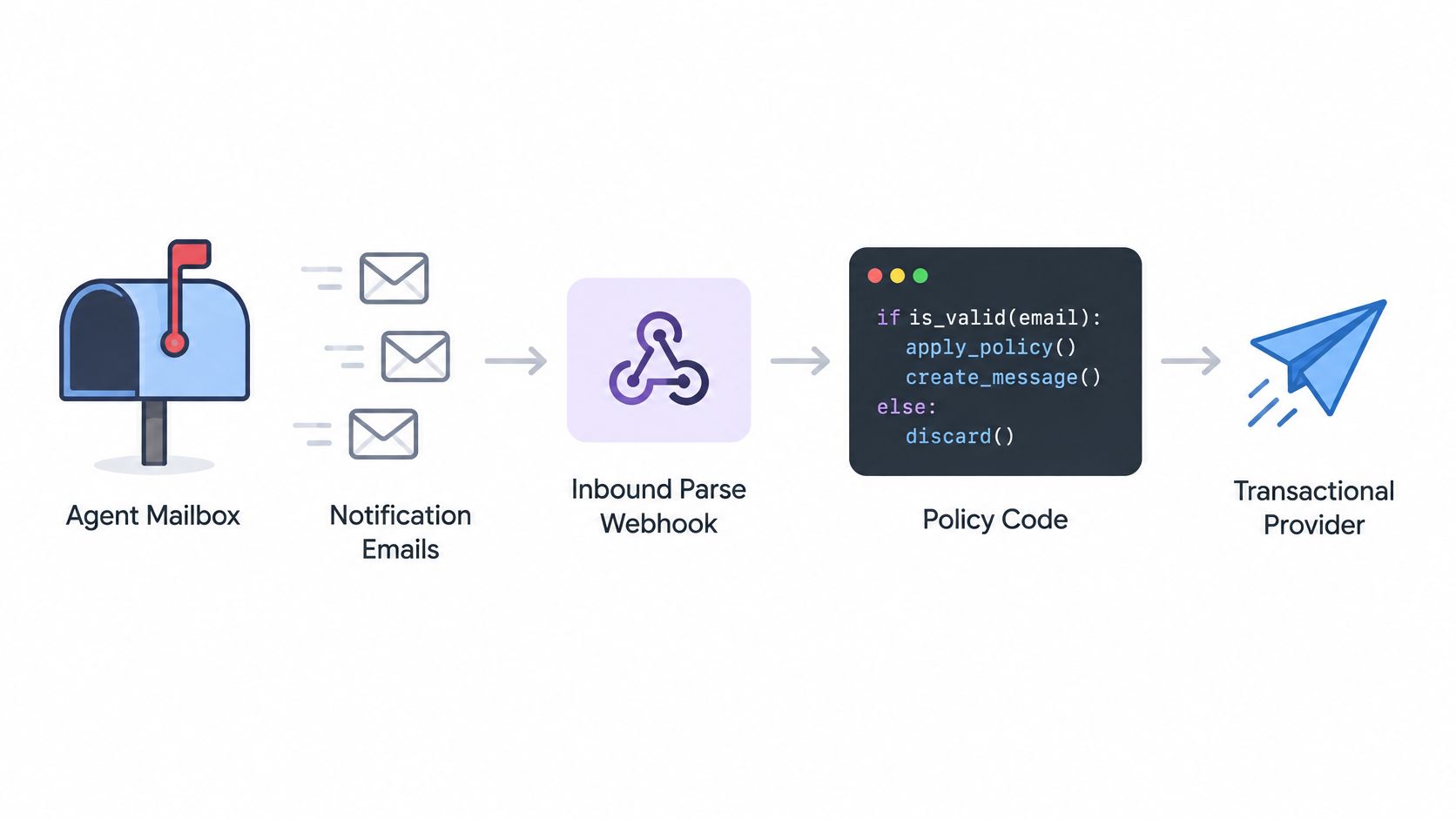
The choice comes down to how much of the surrounding machinery you want to own.
- A few notifications a week: a transactional provider with an inbound parse webhook covers it, and you write and own all the policy code.
- Real conversations: you also need mailboxes, inbound screening, duplicate checks, suppression state and a handoff path to a person, which is a substantial amount of code to build and keep running.
- Somewhere in between: start with a hosted mailbox service and keep your own policy layer on top of the send call.
Whichever route you take, the first connection is the same five steps.
- Pick the interface the agent will use. MCP if the agent runs in a client that supports tools, REST if it's your own service, a CLI if it's a shell on a box.
- Create the mailbox. One address per agent, so audit logs and permissions stay separable.
- Send one test message and read back its status. Confirm that the status moves past accepted, and note what the provider calls each state.
- Subscribe to events using the method you chose earlier, then verify with a real inbound reply.
- Decide the handoff rule for conversations that need judgement, and write it down before the agent meets a real customer.
Molted Email is a mailbox for AI agents, what Gmail is for people. Each agent gets its own email address and inbox, sending and receiving are included without a separate Resend, Postmark or SES account, and new mailboxes run on their own. Approvals are an optional dial: turn on a review step only for the sends you want a person to see first.
Start free at Molted Email, free for people with paid plans from $19 a month. Each agent gets its own address and inbox with sending, receiving and delivery included, so the inbound parsing and event handling described here work without a second provider account. Screens for prompt injection, duplicate and suppression checks on every send, and an optional approval step cover the parts of this guide that are easiest to skip and most expensive to get wrong.