Email Suppression List: How to Build and Enforce One
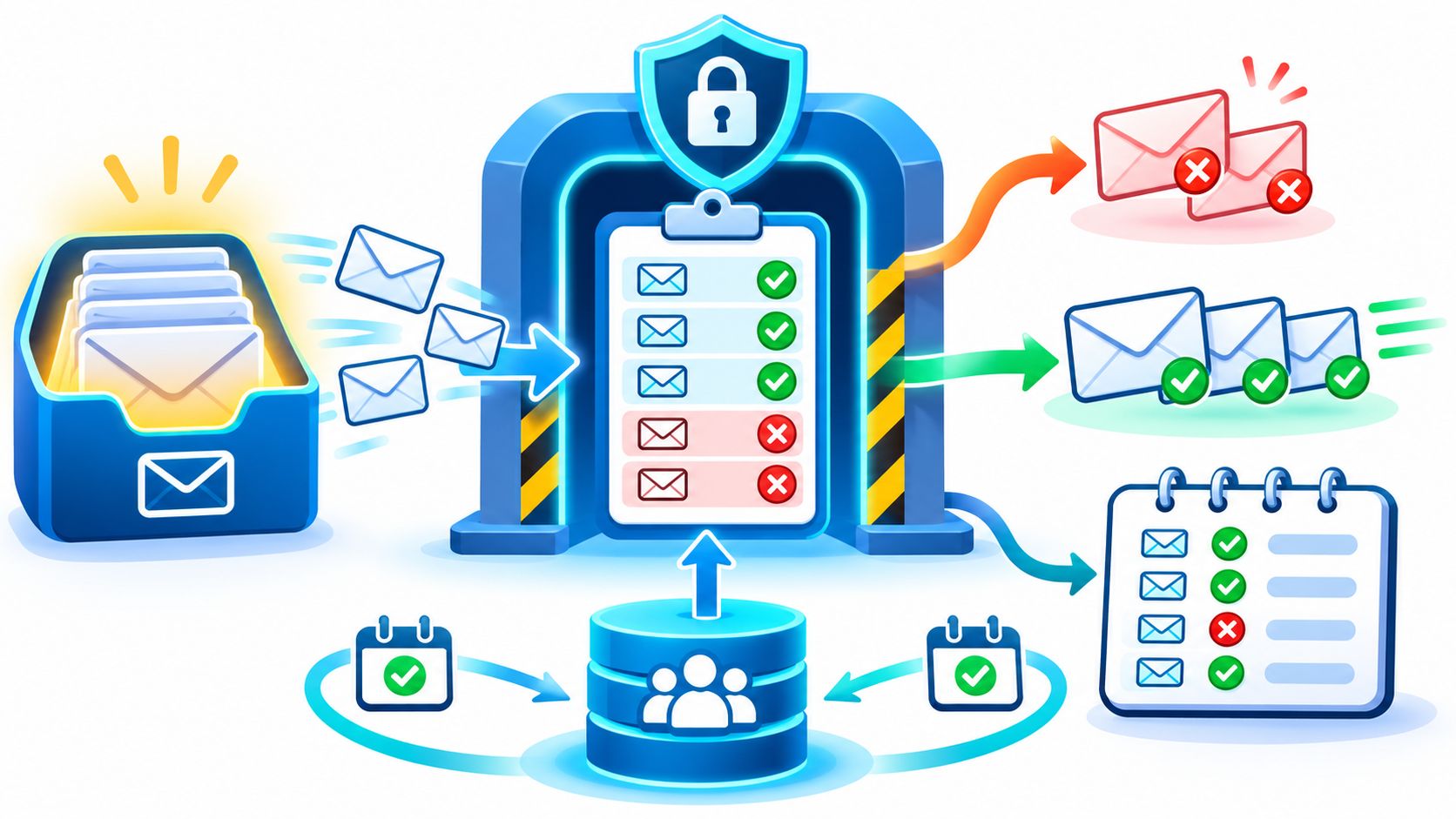
Delete-first workflows make that hard. An outbound rep removes an unsubscribed contact from a CRM, then the address returns through a webinar import, billing sync, or enrichment job. A weekly CSV scrub creates the same gap, because parallel workflows can keep sending for days after the objection was recorded. Once an agent has its own mailbox through Claude Code, Cursor, Codex, MCP, or a REST API, the gap becomes a send-path bug rather than a marketing hygiene issue.
Treat an email suppression list as a shared, send-time safety control that every agent and scheduled job checks before dispatch. Keep the objection even when the rest of the contact profile is removed. For erasure, store a keyed hash so the address can still be matched without keeping it in clear text, and account for the fact that a keyed hash is pseudonymised and can still count as personal data.
Table of Contents
- What an Email Suppression List Stores
- Which Events Add an Address and How Long It Stays
- Compliance Deadlines in the US, UK and EU
- How to Enforce the Check Before Every Send
- Thresholds That Should Pause Your Sending
- Handling Erasure Requests Without Renewed Contact
- Set Up One Suppression List for All Your Agents
What an Email Suppression List Stores
Deleting a contact who clicks unsubscribe looks tidy in a CRM, yet it creates a recurring compliance bug. Say a developer builds an outbound agent that pulls prospects from a Postgres contacts table. A prospect opts out, the webhook handler runs DELETE FROM contacts WHERE email = $1, and the row disappears. Two months later, a teammate imports a fresh spreadsheet from a webinar or syncs a billing export, the deleted address lands right back in contacts, and the agent mails the same person again.
That re-import loop is why the UK Information Commissioner's Office direct marketing guidance advises organizations to retain an opted-out person's details on a suppression or do-not-contact list rather than deleting them. Preserving the objection allows the rest of the contact's marketing profile to be minimized or removed while stopping future lists from overriding the person's preference. The ICO specifies that senders should check every new marketing list against the suppression list before sending and keep the record current across systems.
Think of the registry like a bouncer holding a do-not-admit sheet outside a venue. Changing the guest list inside the room never changes who gets stopped at the gate, because enforcement happens at entry rather than inside the contact database.
Minimum Fields for a Suppression Schema
Storing a bare array of strings falls apart as soon as an auditor asks why an address was blocked or an engineer needs to separate a hard bounce from a newsletter opt-out. Every row in the suppression table should hold seven explicit fields:
- Normalized address: Trim leading and trailing whitespace and lowercase the domain portion (
Alice@Example.COMbecomesAlice@example.com, or fully lowercased if your pipeline treats local parts case-insensitively) so lookups stay deterministic. - Original address: Retain the raw string as received for human inspection, debugging, and display in audit views.
- Suppression reason: Record a constrained enum such as
hard_bounce,soft_bounce_threshold,spam_complaint,unsubscribe, ormanual_block. - Source: Capture what triggered the entry, including webhook provider IDs, feedback-loop feeds, one-click unsubscribe endpoints, or manual operator imports.
- Event timestamp: Store the UTC timestamp of the originating bounce, complaint, or opt-out event rather than just the database insert time.
- Scope: Specify whether the block applies to all outbound mail (
global) or a single message category such asproduct_updatesorcold_outreach. - Append-only history: Keep an immutable change log recording every state transition, who triggered it, and why, so a later update never erases earlier compliance evidence.
You can audit your current setup with a two-minute check today. Pick an email address that was deleted from your active contact table last year, query your outbound suppression store for it, and trace whether an API send call to that address would still be blocked before leaving your server.
Which Events Add an Address and How Long It Stays
Not every failed delivery or negative signal carries the same permanence. An invalid domain will never accept mail tomorrow, whereas a full inbox might clear out in a few days. In an automated mailbox where bounces, complaints, and unsubscribes are added to suppressions automatically, every incoming event needs a deterministic rule before your code touches the database.
| Event | Action | Duration | Basis |
|---|---|---|---|
| Hard bounce (SMTP 5.1.x address or domain error) | Suppress at once | Durable, no retry | Retrying cannot fix it |
| Three soft bounces within 30 days | Suppress | Until operator review or fixed cooldown window | Your mailbox policy, set your own count and window |
| Persistent 5.2.x mailbox errors | Suppress after retry policy ends | Fixed cooldown set by retry policy | Retry count and interval kept in configuration |
| Spam complaint (feedback loop) | Suppress at once | Until the recipient opts back in | Each later send adds sender risk |
| Unsubscribe or opt-out | Suppress and honor | Durable, no expiry | ICO direct marketing guidance |
The distinction between permanent SMTP failures and temporary mailbox errors starts with parsing the Delivery Status Notification correctly. As the Zoho CPaaS suppression list guide notes, hard failures such as SMTP 5.1.x address or domain errors warrant a durable suppression, persistent 5.2.x mailbox failures belong behind a defined retry policy, and feedback-loop abuse reports require immediate suppression because every additional message to a complainant compounds sender risk. If your ingestion worker only checks whether an error code starts with 5 instead of reading the enhanced status code, you will either retry dead addresses or prematurely kill reachable ones. For a detailed breakdown of DSN codes and bounce diagnostics, Mailbeam's walkthrough on reading undeliverable email messages lays out how to separate permanent rejections from temporary deferrals.
Under standard automated mailbox rules, a hard bounce or a spam complaint suppresses the address at once, and three soft bounces within 30 days do the same. Keeping that soft-bounce threshold and retry count in configuration rather than hardcoded constants lets you tune policy per sending workflow while tracking your email bounce rate across recipient domains.
Permanent Objections Versus Expiring Holds
Mixing permanent objections with temporary deliverability holds in the same logic path causes silent policy failures. Marketing objections, unsubscribes, and spam complaints carry no expiration date (expires_at = NULL). They remain active unless the recipient explicitly opts back in through a recorded, verifiable consent flow.
Temporary states work differently. A soft-bounce cooldown, a domain migration freeze, or an engagement sunset should always carry an explicit expires_at timestamp written into the record. When the send-time check queries the registry, it filters for rows where expires_at IS NULL OR expires_at > NOW().
Duplicate-send protection doesn't belong in the suppression registry at all. Stopping an agent from firing two identical emails to the same recipient five minutes apart is a short-lived send-time lock, not a suppression entry. Writing duplicate blocks into the suppression table pollutes your hygiene metrics and risks permanently locking out active contacts who only needed a cooldown.
Mapping Events Without Downgrading Records
Every delivery webhook, bounce parser, and unsubscribe handler should pass through a single mapper function that converts raw events into one row of the table above before executing an upsert. Give each suppression reason an explicit precedence rank: spam_complaint and unsubscribe sit at the top, followed by hard_bounce, followed by expiring holds like soft_bounce_threshold.
State-machine rule: A lower-precedence event must never overwrite a higher-precedence suppression row. If a delayed soft-bounce webhook arrives ten minutes after an unsubscribe, the write handler appends the event to the audit history and leaves the permanent opt-out intact.
That single guard prevents out-of-order webhooks from accidentally attaching an expiry date to a permanent opt-out. Idempotent ingestion guarantees that replayed webhooks from an upstream provider update metadata without spawning duplicate rows or loosening an active block.
Compliance Deadlines in the US, UK and EU
Suppression rules change across borders, and an agent answering inbound leads or running outbound sequences rarely sends to a single jurisdiction. Writing separate suppression timers for US, UK, and EU recipients adds branching complexity that breaks whenever a contact's location is unknown or misclassified. The practical engineering choice is to inspect each legal regime side by side and write code that satisfies the strictest operational requirement globally.
| Regime | Opt-out deadline | Consent or list rule | Retained record |
|---|---|---|---|
| United States (CAN-SPAM) | 10 business days | Unsubscribe mechanism works for at least 30 days after send | Durable opt-out record to prevent future commercial mail |
| United Kingdom (PECR and ICO) | Prompt, no fixed number of days in ICO guidance | Consent generally needed, soft opt-in may apply, opt-out in every marketing message | Suppression or do-not-contact record, not deletion |
| European Union (GDPR) | Without undue delay on objection | Email address is personal data | Minimal prevention record after erasure |
| Google sender guidance | Not a statutory deadline | Keep user-reported spam below 0.10%, avoid 0.30% | Immediate complaint suppression until re-opt-in |
In the United States, the Federal Trade Commission CAN-SPAM compliance guide sets two concrete operational requirements: businesses must honor a recipient's opt-out request within 10 business days, and any unsubscribe mechanism included in an email must remain capable of processing opt-out requests for at least 30 days after the message is sent. Those limits turn opt-out handling into an engineering SLA rather than a periodic marketing chore. If you rotate signing secrets on your unsubscribe tokens every two weeks without retaining the prior key for decryption, your unsubscribe links break before the 30-day window closes.
In the United Kingdom, the ICO PECR electronic mail marketing guide states that organizations generally need prior consent before sending unsolicited electronic marketing to individual subscribers unless the soft opt-in conditions apply, and every subsequent marketing email must provide a clear opt-out route. Once a subscriber withdraws consent or opts out, the sender must add them to a do-not-contact list and consult it before future sends. Under the EU's GDPR, an email address qualifies as personal data, meaning the sender must balance stopping unwanted mail against data minimization and erasure rights.
Building to the Strictest Rule in Code
Comparing those rows points directly to the strictest baseline your pipeline should enforce: treat every opt-out as immediate, keep unsubscribe endpoints functional well past 30 days, and verify recipient provenance before an address ever enters a sending queue. Waiting nine days to sync an unsubscribe list might technically satisfy a 10-business-day ceiling on paper, yet it fails UK promptness expectations, breaks automated multi-step sequences, and drives recipients to hit the spam button instead.
Timing bugs usually surface between list selection and actual delivery. Say a cron job loads 2,000 recipients at 08:00 AM and dribbles messages out over six hours. If a recipient opts out at 08:15 AM from a separate agent thread, a job that only filtered at 08:00 AM will still email them at 11:00 AM.
List sourcing needs its own hard gate before records ever reach an agent. Sending purchased, rented, scraped, or harvested recipient lists and unsolicited bulk email is prohibited, and those lists routinely fail PECR and GDPR consent standards anyway. Add one validation check to every CSV importer and CRM sync job: reject any batch or row that lacks an explicit provenance field recording opt-in consent or an existing customer relationship.
How to Enforce the Check Before Every Send
Treating suppression as a nightly cleanup script leaves hours of exposure between an opt-out event and the next batch sync. Enforcement belongs directly in the send pipeline as a synchronous gate that executes twice: once before a message enters the outbound queue, and once again at final dispatch.
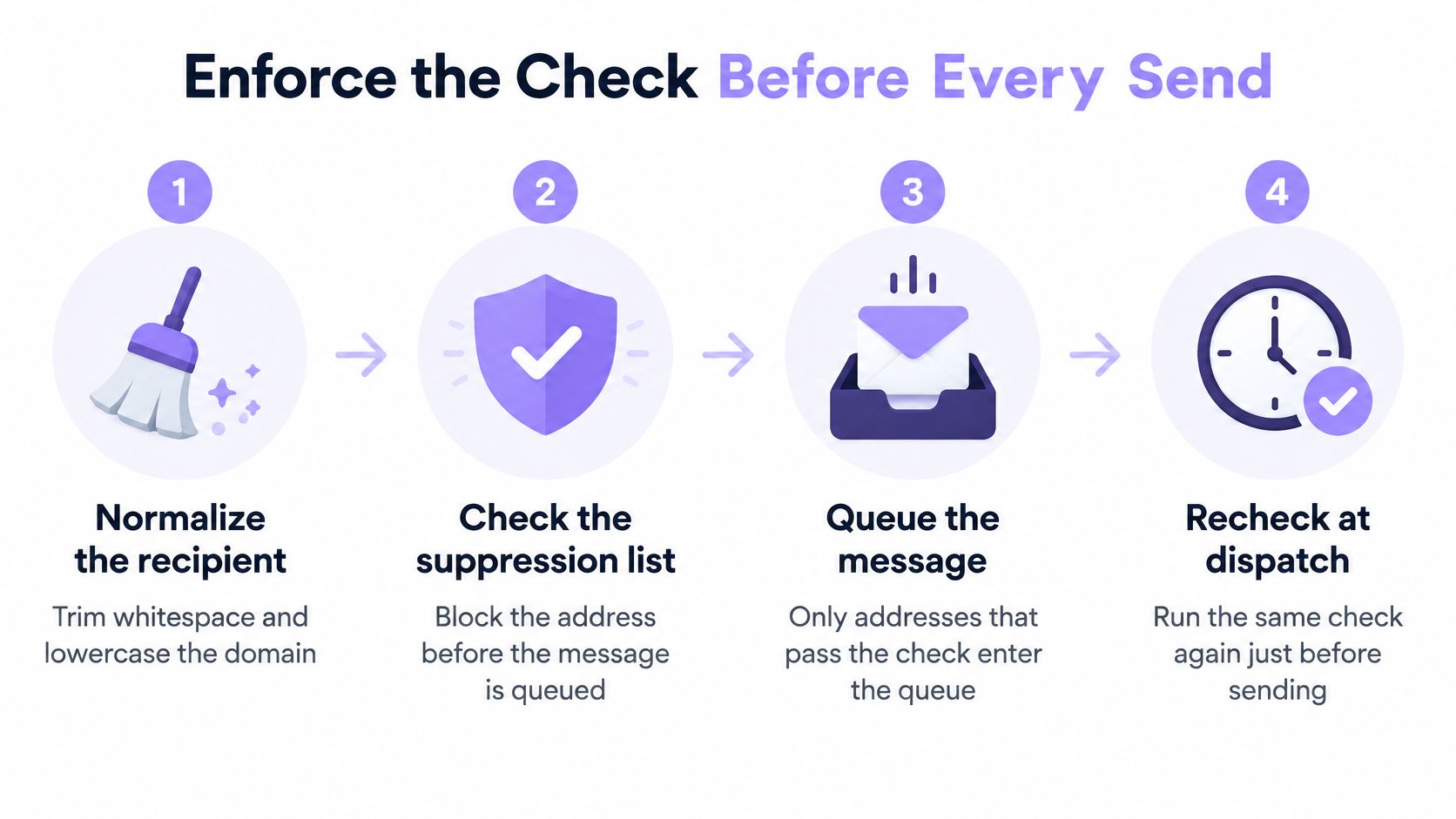
Six Steps From Normalization to Dispatch
Building the check as an atomic sequence closes the race conditions that trip up autonomous pipelines. Each step targets a specific failure mode common in agent-driven mailers:
- Normalize the recipient before any lookup. Trim whitespace and lowercase the domain portion, while preserving the raw string for display and audit records. Decide explicitly whether your matcher folds plus-tags (turning
alex+news@gmail.comintoalex@gmail.com) per provider rule, because ignoring normalization lets a user who opted out asAlex@Example.comget emailed again asalex@example.com. - Run a single read against the shared registry. Query the normalized address and message scope (
globalor the specific category) in one indexed read against the centralized suppression store, never against a cached per-campaign file. Checking a stale local export is how two agents drift out of sync within minutes. - Block before queueing and record the decision. If an active match exists, abort the send before the payload hits your job queue and write the blocked attempt, normalized address, matched suppression ID, and scope to an append-only audit log. Dropping messages without logging leaves engineers blind when users or agents ask why a message never arrived.
- Queue the message, then repeat the lookup at dispatch. An unsubscribe or complaint can arrive in the seconds or hours between message generation and SMTP handoff. Running the identical lookup immediately before transmission catches late opt-outs alongside parallel send-time guards where the same email sent to the same person twice within minutes is blocked.
- Ingest bounce, complaint, and opt-out webhooks idempotently. Put a unique index on
(normalized_address, scope)and use conditional upserts so concurrent agents or retried webhooks update the existing row rather than failing on duplicate-key errors or creating conflicting entries. - Route every outbound path through the same gate. Scheduled jobs, retry workers, manual operator replies, and CSV-triggered drips must call the exact same authorization wrapper. Leaving a legacy retry worker outside the policy layer is one of the primary ways teams suffer deliverability incidents, a pattern explored further in how policy engines prevent deliverability disasters.
Handling One-Click Unsubscribes and Pre-Send Verification
Inbox providers increasingly expect automated, machine-readable opt-outs rather than multi-page preference centers that force recipients to log in. Under RFC 8058, one-click unsubscribe requires two headers on every eligible message: List-Unsubscribe containing an HTTPS URI, and List-Unsubscribe-Post containing the exact single key-value pair List-Unsubscribe=One-Click. The specification also requires a valid DKIM signature covering those unsubscribe headers so mail receivers can verify they weren't tampered with in transit.
When a recipient clicks unsubscribe in their mail client, the provider sends an HTTPS POST directly to that URI without rendering a web page. Your URI needs a signed, opaque token encoding both the recipient identifier and the specific list or scope. The endpoint validates the signature, writes an idempotent suppression event to the shared registry, and returns an HTTP 200 status without sending a follow-up marketing confirmation email.
Never trust a suppression gate that you haven't tested end to end. Before deploying an agent to production, insert a test address into the suppression table, invoke your agent's send command or dry-run endpoint against it, and verify that the audit log captures a pre-transmission block with zero outbound SMTP attempts.
Thresholds That Should Pause Your Sending
A suppression list only knows about addresses that have already bounced, complained, or opted out. It offers no protection the first time a misconfigured agent works through a fresh list of bad contacts. Rate guardrails close that gap: automated thresholds that pause outbound traffic before inbox providers throttle or block the sending domain.
| Metric | Target | Danger line | Automated response |
|---|---|---|---|
| Spam complaint rate | Below 0.10% | 0.30% or higher | Pause sending or require approval |
| Unsubscribe request handling | Processed within 48 hours (internal target) | Any request older than 48 hours | Alert an operator and hold the workflow |
| Hard-bounce rate | Steady baseline for your mailbox | Sustained rise above mailbox baseline | Reduce volume and review the list source |
| Total bounce rate | Stable across recipient domains | Spike on a single domain or workflow | Reduce volume and review recipients by domain |
According to Google's email sender guidelines, senders need to keep user-reported spam rates below 0.10% and avoid reaching 0.30%. Once a sender hits or exceeds 0.30%, delivery support and mitigations may stop being available. Treat these lines as circuit breakers wired directly into the send path, not as weekly dashboard charts. A runaway prompt or a bad enrichment import can tank a domain's reputation in hours, and a chart nobody reads until Friday does nothing to stop it.
For context on normal opt-out behavior, the Dutch Dialogue Marketing Association's International Email Benchmark 2024 reported a 0.14% global unsubscribe rate based on 2023 data. Healthy programs expect steady, low-volume unsubscribes. When spam complaints climb toward 0.10% instead, recipients are either failing to find an easy opt-out or receiving mail they never expected. Class A Media's overview of improving deliverability for Shopify email flows covers the same underlying mechanics: spam-folder placement follows complaint and bounce signals regardless of which platform or storefront generated the mail.
Segmenting Rates Before One Bad List Hides
Account-wide averages lie.
A workspace running four agent mailboxes shows why. Three handle opt-in customer onboarding with near-zero complaints, while a fourth runs an outbound prospecting workflow hitting a 0.45% complaint rate on Gmail recipients. Blended across total volume, the account average sits at 0.08%, the aggregate alarm stays quiet, and Gmail throttles the shared sending domain anyway. Every mailbox in the workspace pays for one workflow's list.
Calculate complaint and bounce metrics across four separate dimensions simultaneously:
- Per mailbox: Isolates a single compromised or misconfigured agent inbox before it drags down neighboring senders.
- Per workflow or campaign: Flags a broken prompt, misleading subject line, or poorly targeted segment.
- Per agent: Catches behavioral drift when one agent starts emailing contacts outside its intended cadence.
- Per recipient domain: Surfaces provider-specific rejections, such as a corporate gateway blocking a template, that global averages conceal.
Pair those metrics with an SLA monitor on opt-out ingestion. Every unsubscribe request should be processed within 48 hours, enforced by a background timer that fires an operator alert and holds the affected workflow if any unapplied request sits in the queue past that window. The timer matters more than the target. A target without an automated check behind it is a hope, and the failure mode it guards against is silent: mail keeps flowing to people who already asked out.
Operator Sequence When an Alert Fires
When a complaint or bounce guardrail trips, the policy engine must lock the affected scope automatically. An agent can tighten a threshold on its own, but loosening one should require a person. An autonomous agent cannot be trusted to diagnose why its own list is failing, and a pause it can override is not a pause.
Human operators should follow a fixed four-step recovery sequence:
- Inspect the segmented metrics to isolate the exact mailbox, workflow, or recipient domain driving the spike.
- Confirm the workflow is paused or switched to manual approval, and check that nothing already queued can still leave.
- Audit the source and consent provenance of the recipients contacted during the window that tripped the alarm.
- Resume automated sending only after a named person clears the hold and logs the root cause.
One design detail decides whether step two holds in practice: expiry. If a pause routes sends into a manual approval queue, unanswered requests should expire unsent rather than wait indefinitely. A queue with no expiry converts a temporary pause into a silent backlog, and the first person who bulk-approves it re-creates the original incident at full volume.
Handling Erasure Requests Without Renewed Contact
Generic compliance advice tells engineers to "keep unsubscribes forever," then leaves them stuck the first time a European user submits a GDPR erasure request. An email address is personal data under GDPR, so holding it in plain text after a deletion request creates privacy exposure. Deleting it completely removes the suppression guard, recreating the exact re-import bug that leads to unlawful marketing later.
Operational gaps like this show up sharply in real-world audits. In the Unspam 2025 Email Deliverability Benchmark Report, only 14% of reviewed emails used a compliant List-Unsubscribe header, only 49% complied with GDPR, and just 3% met all CAN-SPAM requirements. The failure isn't a shortage of legal definitions; it's the absence of distributed engineering controls that handle erasure, alias matching, and multi-agent synchronization cleanly.
As EmailMarketing.net's guide on GDPR and suppression lists highlights, resolving the tension between erasure and durability requires separating identity removal from contact prevention. For example, on Molted Email, privacy requests are routed to a dedicated address (privacy@molted.email) so deletion workflows run outside normal agent inbox handling.
Six Steps to Separate Identity Removal From Contact Prevention
Wire your erasure endpoint to execute these six steps atomically whenever a data subject requests deletion:
- Purge identity and conversation data. Delete profile columns, contact names, enrichment attributes, and stored message bodies linked to that person across your application tables.
- Replace the plaintext address with a keyed hash. Compute an HMAC-SHA256 digest of the normalized email address using a dedicated secret key, and store only that token in the suppression registry so future pre-send checks can still match incoming candidates.
- Minimize the retained metadata. Keep only the suppression reason, UTC timestamp, and scope needed to demonstrate compliance, stripping out free-text notes, IP addresses, or user-agent strings.
- Restrict registry reads to boolean checks. Lock direct table queries away from AI agents. Expose a narrow check function (
is_suppressed(address, scope) -> bool) so an agent can verify whether a send is allowed without reading, listing, or inferring stored personal data. - Apply expiry dates strictly to temporary states. Never attach an
expires_atvalue to a marketing objection or erasure-backed suppression; restrict expiration to temporary bounces or migration freezes. - Log the erasure and token link. Write the erasure request ID, completion timestamp, and matching suppression token ID to the immutable audit trail so you can prove the plaintext data was removed while contact prevention stayed intact.
The Pseudonymisation Caveat and Normalization Risk
Teams frequently mistake hashed email addresses for anonymous data. That assumption fails legal review.
A keyed hash is pseudonymised, not anonymised, which means it can still count as personal data under GDPR. Document your legal basis for retaining the minimal prevention record and confirm the exact architecture with privacy counsel for your jurisdiction.
Store the HMAC key in a separate secrets manager, never in the same database or backup snapshot as the suppression table. Anyone who obtains both the secret key and the token column can hash a dictionary of candidate emails and confirm whether a specific person sits on the list.
The biggest engineering risk with hashed suppressions is normalization drift. Plaintext tables let you run a forgiving ILIKE query in a pinch; hashed tables demand exact byte-for-byte equality on every write and read path. Before shipping, run an automated test suite feeding mixed-case addresses (Sam.Lee@Domain.COM), trailing spaces, and plus-addressed variants (sam.lee+test@domain.com) through both the erasure writer and the dispatch-time checker to verify identical digests every time.
Set Up One Suppression List for All Your Agents
Multi-agent setups fail fast when each script or agent maintains its own contact state. Say a founder runs two agents: one drafts product onboarding replies via Cursor and an MCP server, while a second handles outbound follow-ups through a scheduled REST script. Both pull from overlapping spreadsheets. A prospect replies to the onboarding agent asking not to be contacted again, that agent appends the address to a local CSV, and the follow-up agent emails the same person the next morning because its script never saw the file.
Fixing that failure requires one authoritative suppression registry that every agent reads before queueing and before dispatch, fed by bounce, complaint, and unsubscribe events from every sending path with one authoritative write per event. Alongside shared suppression checks, pairing your registry with a coordination mechanism like using a contact lease to prevent simultaneous outreach stops two agents from emailing the same recipient at the exact same moment.
If you'd rather not build and operate that entire mail infrastructure yourself, Molted Email provides a mailbox for AI agents, functioning for agents the way Gmail works for humans. It isn't an API wrapper or a layer on top of Resend, Postmark, or SES, so developers don't need a separate email provider account. New mailboxes run on their own by default, with human approvals available as an optional dial. Every agent on an account works from the same suppression list (including whole-domain suppression), bounces, complaints, and unsubscribes are recorded automatically, and agents can tighten rules while only a person can loosen them.
Three Decisions to Make Before Your Next Send
Whether you build the registry in Postgres or run it through a managed agent mailbox, lock down three operational decisions before your next automated send, tying each one directly to your schema:
- Decide which events write to the registry (
source). Stick strictly to the event mapping table (hard bounces, configured soft-bounce thresholds, persistent mailbox errors, spam complaints, unsubscribes, and verified operator blocks). Drop transient network timeouts, rate-limit retries, and short-term duplicate blocks before they pollute the table. - Define message categories explicitly (
scope). Separate marketing and outreach scopes from transactional categories in thescopecolumn. An opt-out from a weekly product digest must reliably block future digests without silently breaking password resets, invoices, or security alerts the user still expects. - Enforce asymmetric permissions on loosening blocks (audit log). Allow automated workflows and agents to add suppressions or tighten sending rules whenever they detect an opt-out or bounce. Reserve permission to remove a permanent suppression record strictly for a named human operator, and require every manual removal to write an identity, reason, and timestamp into the append-only audit log.
Molted Email gives AI agents their own hosted mailboxes with shared suppression lists, automatic bounce and complaint recording, and send-time policy checks across MCP, a CLI, and a REST API. Wire your agents into one shared safety layer without building custom bounce parsers or maintaining separate email provider accounts. Start free at Molted Email (free for people, paid plans from $19 a month).